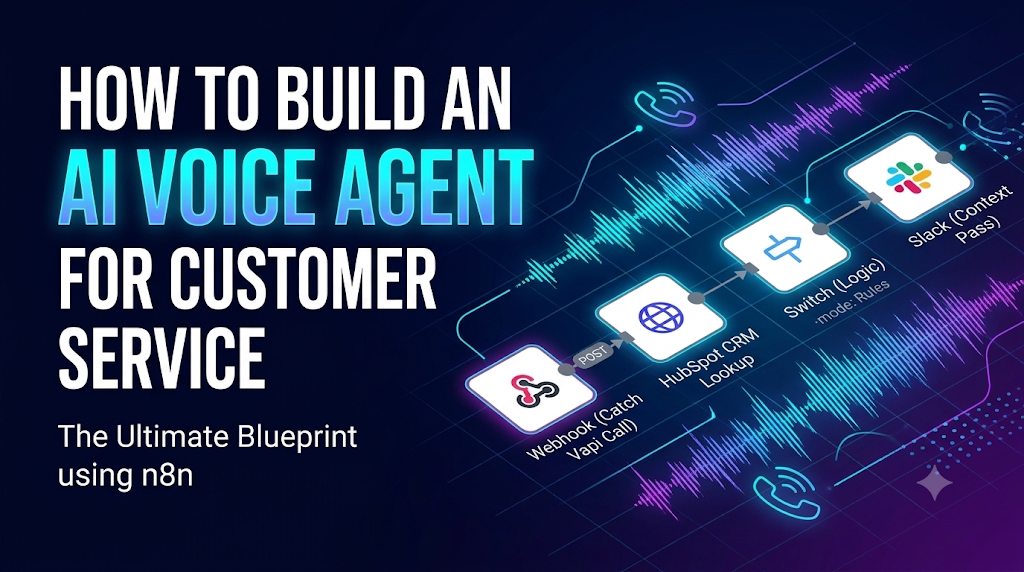
An AI voice agent is a software system that can answer inbound phone calls, speak with customers in natural human language, and resolve support tickets in real time. Unlike traditional robotic IVR menus (“Press 1 for Sales”), a modern AI voice agent uses large language models to hold dynamic, two-way conversations.
Every business wants to automate their call center to provide 24/7 support and cut costs. However, moving from text-based chatbots to live phone calls is incredibly difficult. While a text-based AI customer service agent has a few minutes to read a database and type a reply, a voice agent must listen, think, and speak back in less than one second.
In this guide, we break down exactly how to build a production-ready AI voice agent, the technology stack you need, how to build it in n8n, and the engineering guardrails required to keep your system safe.
Why Most AI Voice Agents Fail in Production (The Latency Problem)
If you build an AI voice bot using standard API calls, it will likely fail. The biggest killer of voice AI is latency (the delay between the customer stopping their sentence and the AI starting its reply).
If the AI takes 2 seconds to think, the customer will assume the line is dead, say “Hello? Are you there?”, and break the entire logic loop. To make a voice agent feel human, your total latency budget must be strictly under 800 milliseconds. This means you cannot string together basic API calls; you need an optimized streaming architecture.
The 4 Core Components of a Voice AI Tech Stack
To hit sub-800ms response times, you need four distinct layers working together in a live stream. Here is the recommended enterprise stack:
| Component | Function | Top Tools for Speed |
|---|---|---|
| STT (Speech-to-Text) | Listens to the caller and converts their voice into text instantly. | Deepgram (fastest transcription) |
| LLM (The Brain) | Reads the text, applies logic, and generates the text reply. | GPT-4o or Claude 3.5 Haiku |
| TTS (Text-to-Speech) | Converts the LLM text reply back into a human-sounding voice. | ElevenLabs or PlayHT |
| The Orchestrator | Manages the live phone call, WebSocket connections, and latency. | Vapi.ai, Retell AI, or Bland AI |
The “Half AI, Half Human” Strategy (Triage and SIP Transfer)
The biggest mistake companies make is trying to let the AI handle 100% of the phone call. In a real production environment, you should design your system for a Triage and Transfer model.
The AI answers the phone instantly, collects the customer account number, verifies their identity, and asks about their problem. If the problem is simple (like checking an order status), the AI handles it. If the problem is complex, sensitive, or the customer sounds angry, the AI performs a SIP Transfer to a live human agent.
However, transferring a call has one major risk: making the customer repeat themselves. To fix this, your architecture must pass the context. Before the AI transfers the audio call via Twilio, it must send the call transcript and a one-sentence summary to the human agent’s screen.
Step-by-Step: Building the Voice AI Logic in n8n
Here is how we build the backend logic for an AI voice agent using n8n and an orchestrator like Vapi.ai.
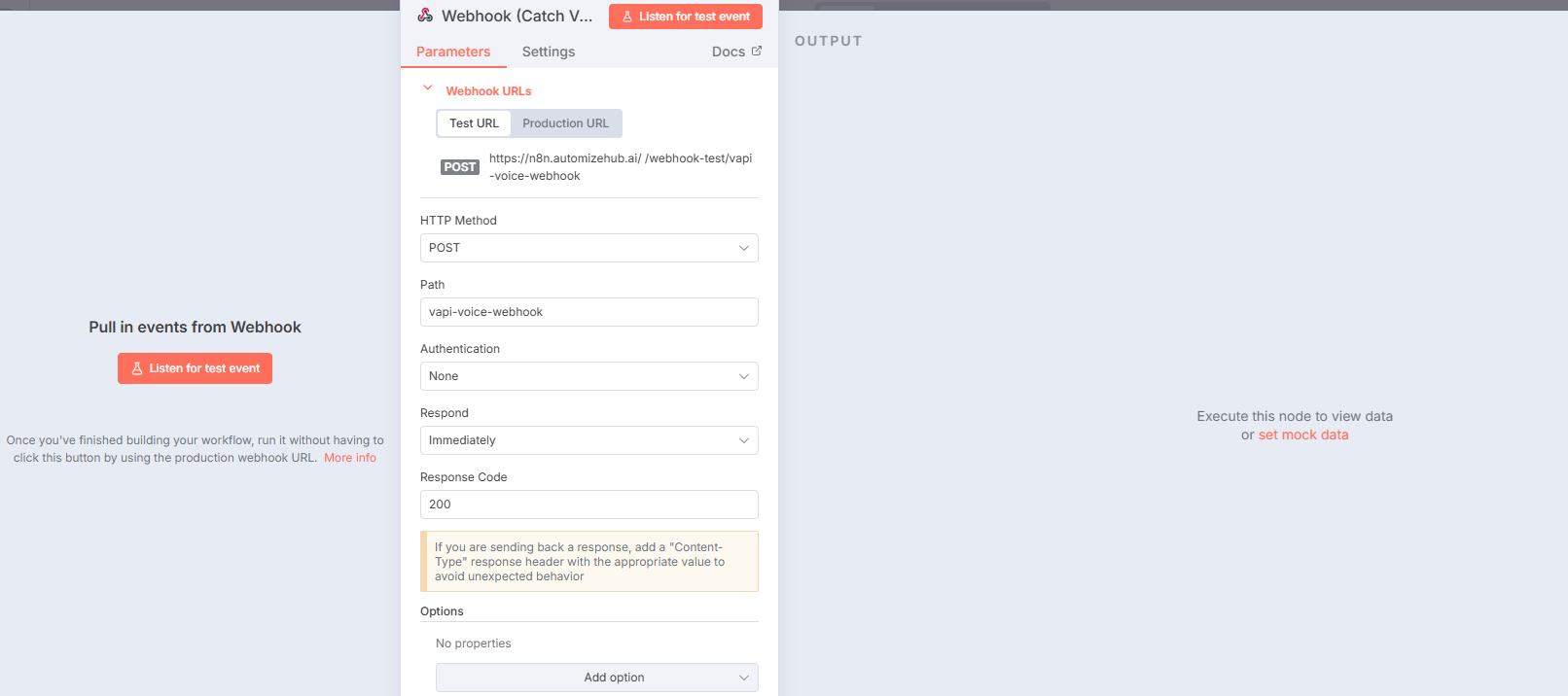
Step 1: The Fast Webhook Catch
When the AI voice agent needs to look up a customer in your database mid-call, Vapi fires a webhook to n8n. Your n8n webhook must be incredibly fast.
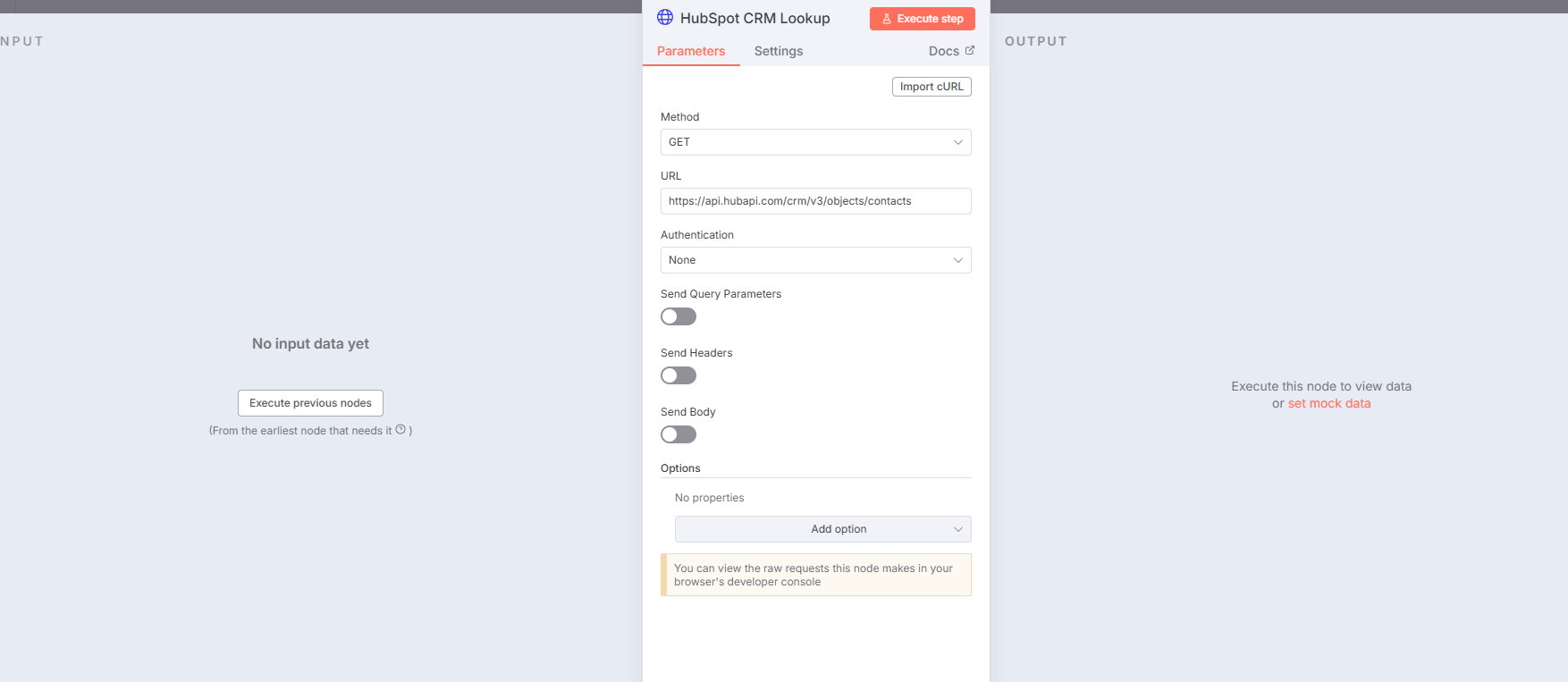
Step 2: The Latency-Safe Database Lookup
While the customer is on the phone, the AI says, “Give me one second while I pull up your file.” During that 1.5-second window, n8n queries your Postgres database or HubSpot CRM using the caller ID to fetch their recent orders.
Step 3: Routing Logic (AI vs Human)
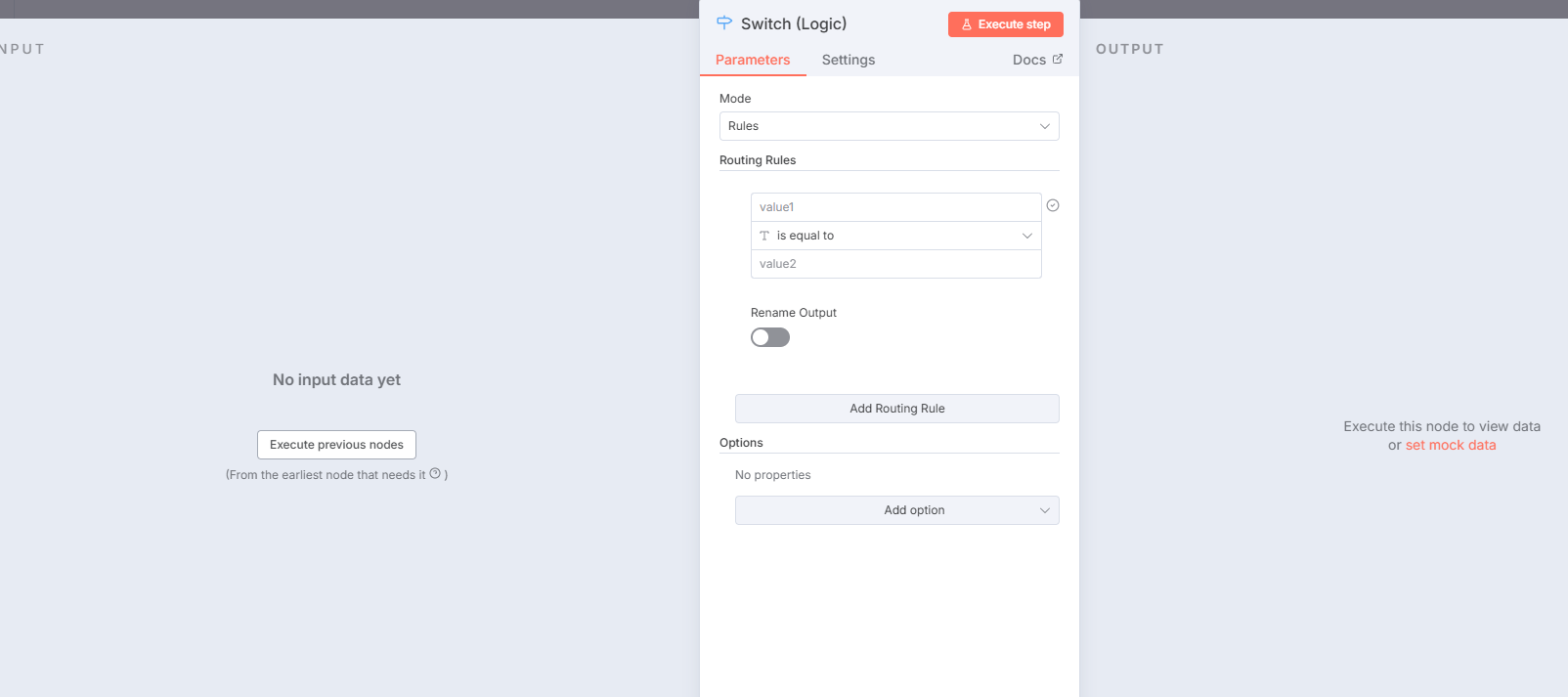
Next, we use a Switch node in n8n. We check the intent extracted by the LLM. If the intent is “cancel_subscription” or the sentiment score is negative, we route the workflow to the Human Handoff path.
Step 4: Context Passing Before The Ring
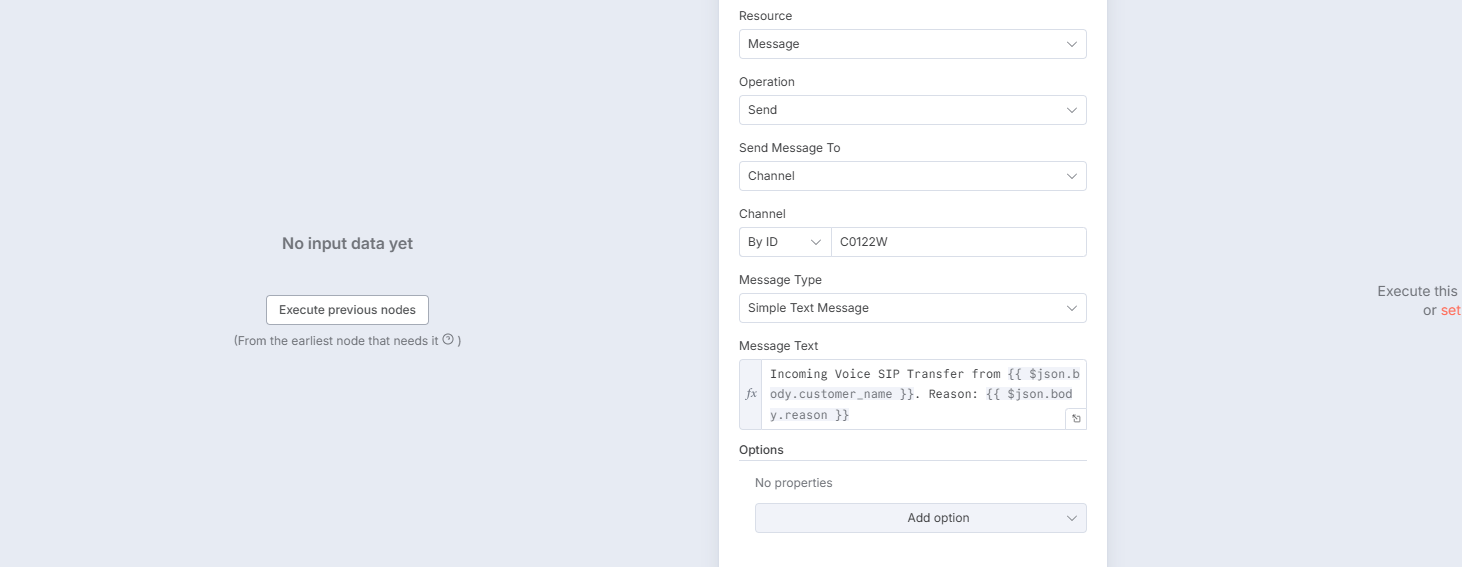
Before n8n tells Vapi to execute the SIP transfer, it fires a message into the sales team’s Slack channel or Zendesk queue. The message says: “Incoming call from John Doe. He is calling about a delayed refund for Order 12345.” By the time the human picks up the phone, they already know the whole story.
Advanced Engineering Guardrails for Voice AI
If you post your voice AI architecture on developer forums like Reddit or HackerNews, senior engineers will immediately look for these three edge cases. Here is how you protect your system.
1. Handling “Dead Air” During Database Checks
If your n8n workflow takes 3 seconds to fetch data from Salesforce, the customer will hear 3 seconds of absolute silence on the phone. They will hang up. You must configure your voice orchestrator to play a filler sound (like typing noises or saying “I am just bringing up your details now”) while waiting for the n8n webhook to return the data.
2. Interruption Handling (Barge-in)
Humans interrupt each other all the time. If your AI is speaking a long sentence and the customer suddenly says “Wait, no, that is the wrong address,” the AI must stop talking instantly. Your orchestrator tool must support “Barge-in” detection to immediately kill the Text-to-Speech audio stream and start listening again the exact millisecond the customer speaks.
3. Guarding Against Hallucinations on Live Calls
If a text chatbot hallucinates a refund, a human reviewer can catch it before it executes. On a live call, the AI is speaking directly to the customer. You must never give the voice agent direct write access to your payment gateway. Instead, let the AI tell the customer “I have submitted a refund request for approval” while n8n passes a draft to a human manager.
Text AI Agents vs. Voice AI Agents (When to Use Which)
You should not automate everything with voice. Here is a simple rule to follow:
- Use Text AI Agents (Email/WhatsApp): For complex troubleshooting, billing disputes, or technical support where the agent needs time to search databases and read policy documents.
- Use Voice AI Agents (Phone): For immediate triage, appointment setting, order status checks, and simple FAQs. Voice is best for speed to lead automation where you need to call an inbound lead the moment they fill out a form.
Frequently Asked Questions (FAQs)
How much does an AI voice agent cost per minute?
In a production setup, an AI voice agent typically costs between $0.10 to $0.15 per minute. This includes the combined costs of the telephony provider (Twilio), the STT engine (Deepgram), the LLM (OpenAI), and the TTS engine (ElevenLabs).
Can an AI voice agent transfer a call to a human?
Yes. By using SIP trunking and an orchestrator like Vapi, the AI can place the caller on a brief hold and patch a live human support rep into the same phone call, creating a seamless handoff.
What is the best LLM for voice AI?
Speed is more important than deep reasoning for phone calls. Models optimized for fast inference, such as GPT-4o-mini or Claude 3.5 Haiku, are currently the best choices to keep latency under the 800-millisecond threshold.
Build a Production-Ready Voice Agent
Setting up a basic AI phone number takes an hour. Building a robust system that handles interruptions, integrates with your CRM via n8n, passes context to human agents, and scales across thousands of calls requires deep engineering.
If you want to automate your inbound call center without risking bad customer experiences, explore our custom AI agent development services or book a free architecture audit with AutomizeHub today.


No Comments