Customer support teams deal with thousands of repeated questions every single week. Customers want fast answers about shipping, order status, refunds, and simple account fixes, but hiring a large human support team costs a lot of money and creates slow response times during peak hours.
This guide shows you how ai agents for customer service can solve support tickets automatically. Modern AI setup drops the average resolution cost from $6.00–$8.00 per human ticket down to just $0.50–$0.70 per ticket, while making first response times 74% faster. You will learn how to build smart AI agent teams using multi agent system architecture and model context protocol mcp.
Quick Summary (Spoilers First!)
- Cost Savings: Cut ticket costs from $6.00–$8.00 (human) down to $0.50–$0.70 per AI resolution.
- Speed & Volume: Deliver 74% faster first reply times and drop repetitive ticket volume by 68%.
- Multi-Agent Power: Split complex jobs across a Greeter, Research, and Action Agent.
- Universal Connectivity: Connect AI directly to live software using model context protocol mcp.
Table of Contents
- 1. Why Normal CRM Chatbots Fail at Customer Service (Resolution vs. Deflection)
- 2. What Is Multi Agent System Architecture? (Why One AI Bot Is Not Enough)
- 3. How Model Context Protocol MCP Works: The Universal USB-C Cable for AI
- 4. How to Build AI Agents for Customer Service and Operations (5 Simple Steps)
- 5. Best AI Agents for Business: 3 Ways to Build Yours in 2026
- 6. Real Business Story: How an Online Store Cut Support Tickets by 68%
- 7. Frequently Asked Questions (FAQs)
Why Normal CRM Chatbots Fail at Customer Service (Resolution vs. Deflection)
Have you ever asked a support chat for help, only for the bot to send you a link to a long help page? That experience frustrates customers and forces them to leave bad reviews.
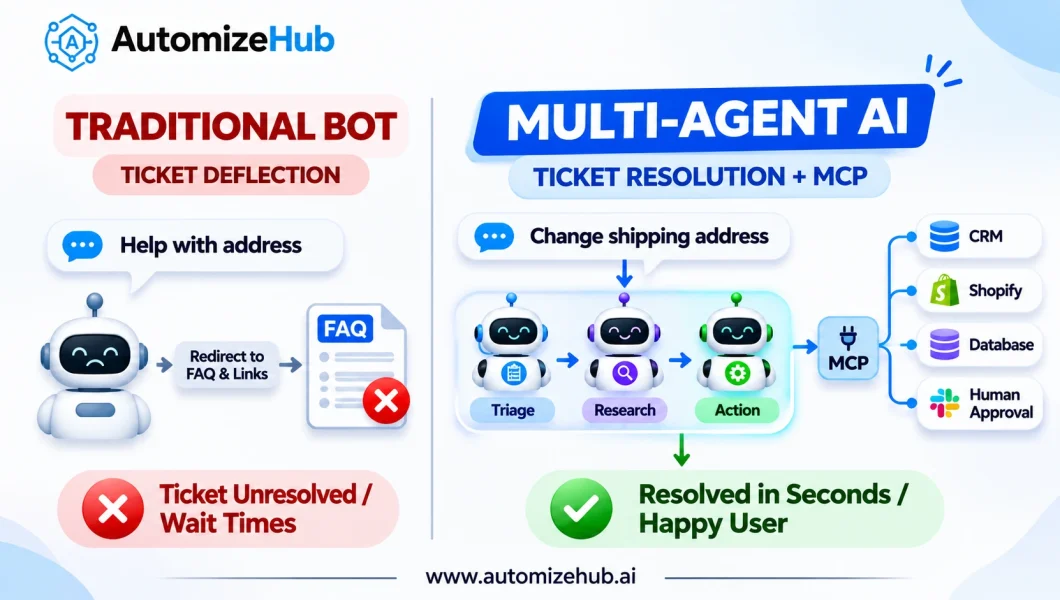
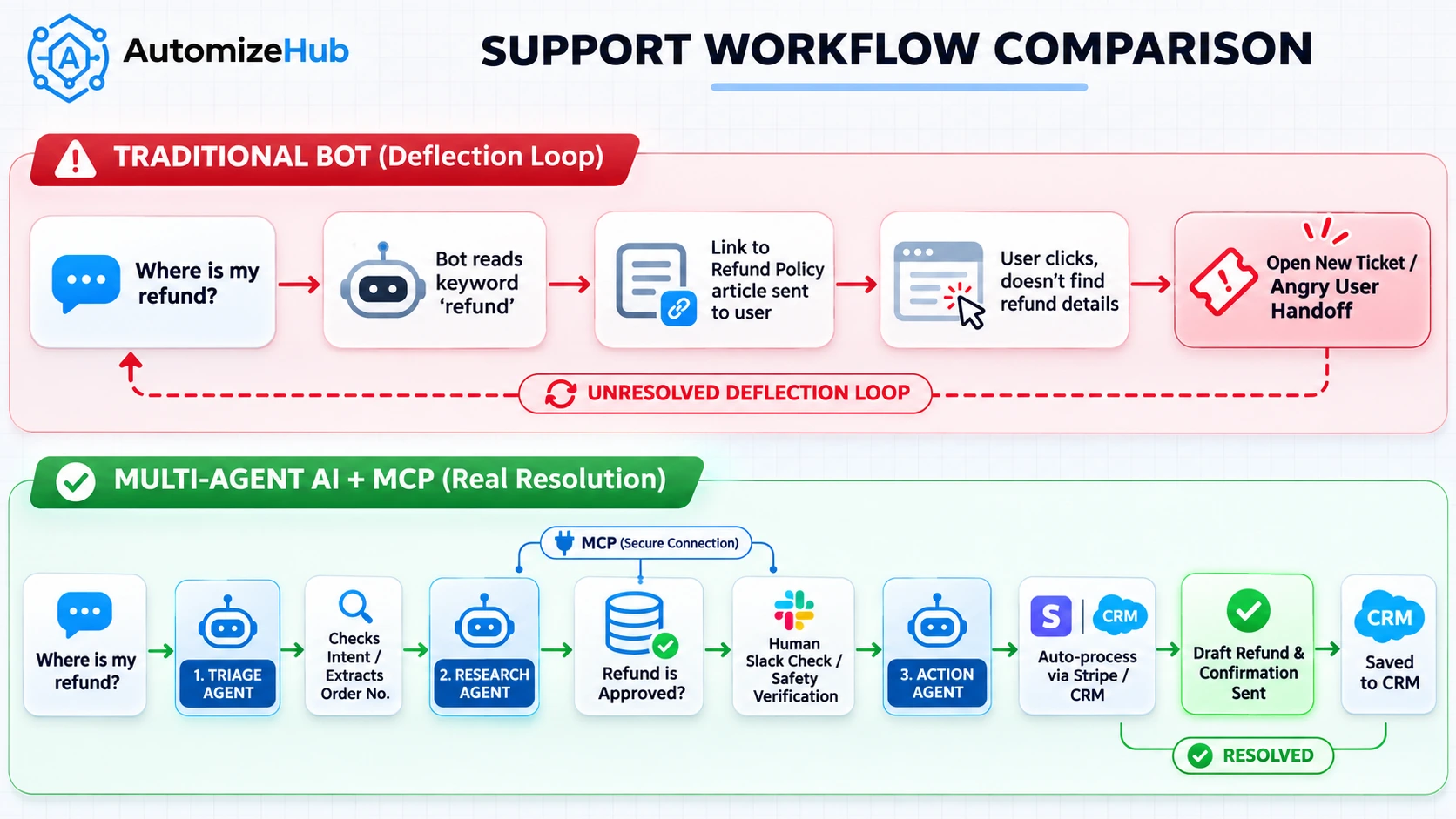
Old customer service chatbots do not solve problems. Most traditional software uses ticket deflection, which means the bot shows a link to a help center article and closes the ticket without fixing the issue. When a customer receives an article link instead of help, they get angry and open another support ticket.
Real customer service requires ticket resolution. Resolution means taking real action in your business software to solve the customer problem completely.
For example, consider Order #4829 where a customer accidentally types the wrong shipping address. A traditional chatbot tells the user to read the shipping policy. A true ai agents for customer service system checks the store database, verifies that the package has not shipped yet, updates the shipping address in your logistics system, and emails the customer a confirmation number.
Real AI agents share four core traits:
- Autonomous action: They act on their own rules without needing a human to click every button.
- Real-time reaction: They read live data from your CRM, store, or warehouse database instantly.
- Proactive steps: They notice missing data early and ask the right questions before starting a task.
- Team collaboration: They pass tasks to specialized secondary agents when a job requires extra security or specific tools.
What Is Multi Agent System Architecture? (Why One AI Bot Is Not Enough)
Trying to build one single AI prompt to handle all customer support jobs is like running a busy restaurant with only one staff member. If one person tries to cook food, wash dishes, greet guests, and manage payments all at once, service slows down and orders get mixed up.
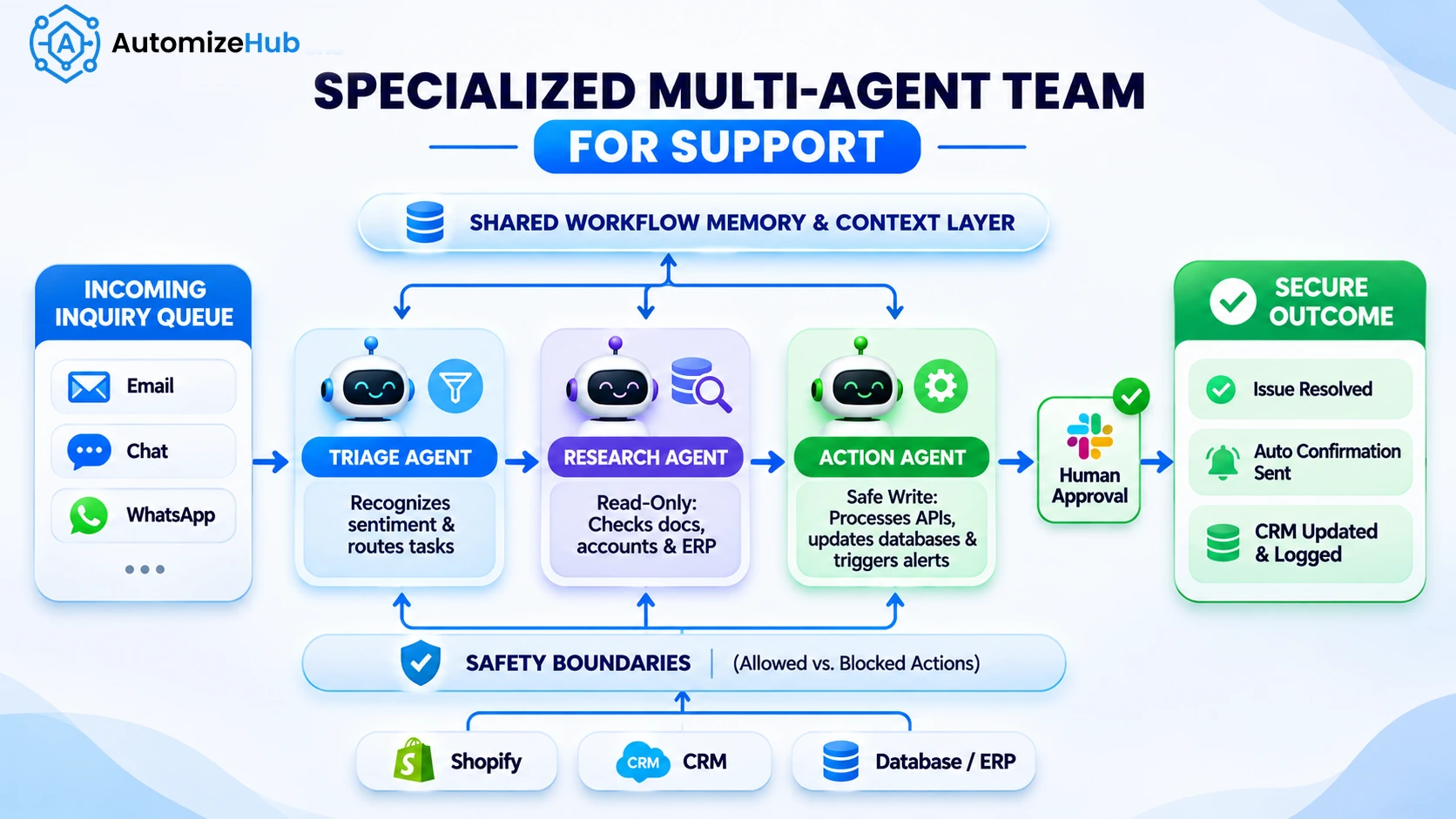
A multi agent system architecture solves this problem by creating a team of specialized AI agents. Each agent handles one specific job, shares context with teammates, and operates with strict safety controls.
When you ask how to build ai agents for customer service, a standard 3-agent support team structure works best:
- Greeter & Triage Agent: Reads incoming messages, identifies customer sentiment, checks intent, and decides which department should handle the request.
- Research Agent: Looks up customer account history, checks warehouse inventory, reads knowledge base articles, and gathers facts.
- Action & Safety Agent: Executes allowed API calls like updating shipping addresses or processing approved refunds after verifying safety rules.
3 Common Multi Agent System Architecture Patterns
When designing a multi agent system architecture, you can organize your agents using three main structural patterns:
- Supervisor / Centralized Boss Pattern: One main supervisor agent receives the user message, breaks down the steps, assigns tasks to sub-agents, and reviews their answers before replying.
- Step-by-Step Pipeline / Sequential Pattern: Agents pass work down a single line. Agent A cleans the raw input, Agent B retrieves order data, and Agent C writes the final answer.
- Layered / Hierarchical Pattern: High-level strategic agents coordinate mid-level department agents (e.g., Billing, Technical Support, Returns), which manage low-level execution scripts.
Here is how traditional chatbots, single AI bots, and multi-agent systems compare:
| Feature | Old Rule-Based Bot | Single AI Chatbot | Multi-Agent System + MCP |
|---|---|---|---|
| Primary Focus | Ticket Deflection | Text Generation | Complete Ticket Resolution |
| Database Access | None (Static Links) | Read-Only Search | Read & Secure Write via MCP |
| Complex Tasks | Fails / Fixed Menus | Hallucinates or Confuses Steps | Splits Tasks across Agents |
| Average Cost / Ticket | $6.00+ (Forces Human Handoff) | $2.50 (High Error Rate) | $0.50–$0.70 (Automated Resolution) |
How Model Context Protocol MCP Works: The Universal USB-C Cable for AI
Before modern AI standards existed, connecting an AI model to company software required custom API code for every single app. If you changed your CRM or store platform, your engineering team had to rewrite all custom integrations from scratch.
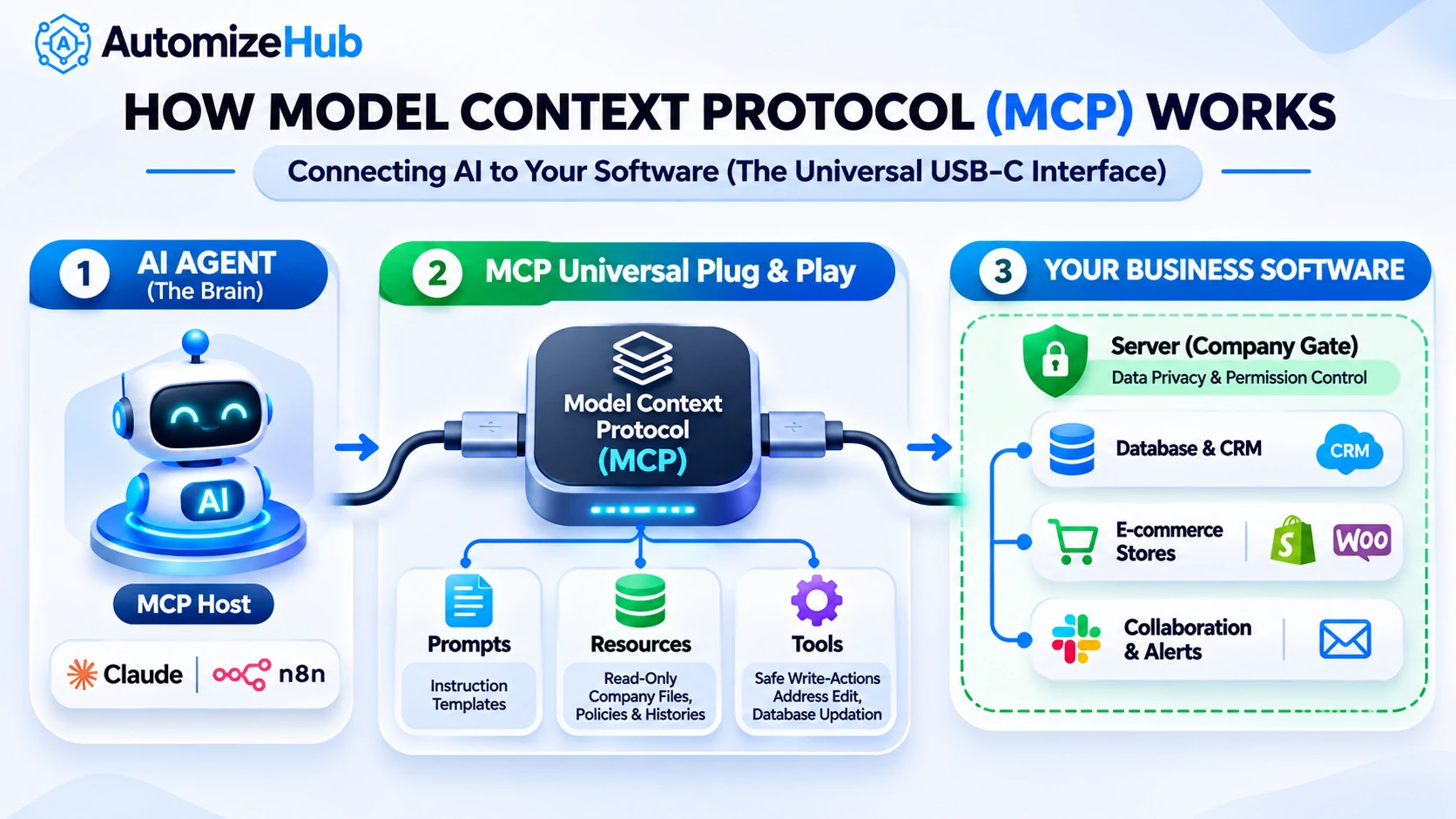
The model context protocol mcp solves this headache completely. Think of model context protocol mcp as the universal USB-C cable for AI software. Just as a single USB-C cable lets you plug monitors, hard drives, and chargers into any laptop, MCP gives your AI agents a single standardized way to talk to any database, CRM, or external tool.
You can also think of MCP like an Air Traffic Control tower. The tower standardizes communication rules so planes from different airlines can safely land on any runway without radio confusion.
The open-source specification at Model Context Protocol relies on three main components:
- MCP Host: The main application or AI platform (such as Claude Desktop, n8n, or an agent runtime) where the user interacts.
- MCP Client: The internal engine inside the host that manages secure connections to external servers.
- MCP Server: A lightweight program that exposes company tools and files safely to the AI client.
The 3 MCP Building Blocks (Primitives)
Every MCP server communicates using three fundamental primitives:
- Prompts: Pre-written instructions and template prompts that guide how the AI should structure its reasoning.
- Resources: Read-only data sources such as order receipts, help documentation, policy files, and customer account records.
- Tools: Safe action functions exposed to the AI model, such as updating shipping addresses or generating refund drafts.
4 Types of Shared Memory & Context
To make sure agents work together without forgetting previous messages, enterprise systems use four types of context:
- Past Chat Context (Temporal): Keeps track of recent conversation history so the customer never repeats details.
- Goal & Rule Context (Task): Defines the exact objective for the current interaction and strict business constraints.
- Company Fact Context (Domain): Supplies accurate business facts retrieved from official knowledge bases.
- Team Status Context (Social): Helps agents track what steps other sub-agents have completed so far.
Agent Safety & Scope Boundaries
Giving AI agents full permission to modify company databases without oversight creates serious security risks. Setting up strict permission limits, guardrails, and scope boundaries prevents prompt injection attacks and unauthorized actions. For a deeper breakdown of defensive controls, read our full guide on what is agentic AI in security and fraud prevention.
MCP vs. A2A (Agent-to-Agent) Communication
It is easy to confuse MCP with Agent-to-Agent (A2A) communication protocols. Put simply, MCP connects an AI agent directly to software tools and databases, while A2A protocols allow separate AI agents to pass work to each other.
How to Build AI Agents for Customer Service and Operations (5 Simple Steps)
Building production-ready ai agents for customer service does not require months of custom code. Following a step-by-step framework ensures your AI deployment remains safe, fast, and cost-effective. Here is how to build ai agents in five practical steps.
Step 1: Pick One Real Problem and Write an Agent Job Sheet
Do not attempt to automate your entire support department on day one. When starting out, it is best to focus on one high-volume, low-risk process first. To learn more about selecting high-impact starting points, read our guide on building agentic AI applications with a problem-first approach.
Before writing any code, create a simple Agent Job Sheet (Manifest) detailing:
- Role & Objective: e.g., “Order Status & Address Change Agent.”
- Allowed Tools: get_order_details, check_shipping_status, update_address.
- Blocked Tools: delete_account, issue_full_refund_over_50.
- Escalation Trigger: Ask a human agent whenever user sentiment score drops below 30% or order value exceeds $500.
Step 2: Connect Live Business Data Using MCP and RAG
Connect your knowledge base files and database using MCP resources and Retrieval-Augmented Generation (RAG).
Always enforce strict read/write separation. Give your Research Agent read-only access to customer records and product stock. Restrict write permissions (such as editing account details or initiating refunds) strictly to your Action Agent, guarded by automated approval checks.
Step 3: Build Your n8n AI Agent Workflow with Crash Protection
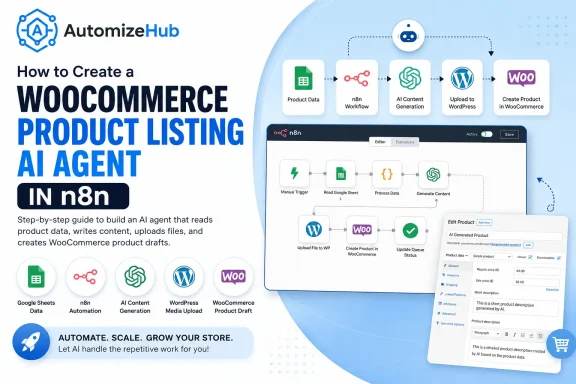
Visual automation platforms like n8n make assembling agent networks simple. For a complete technical walkthrough, check out our tutorial on how to create a WooCommerce product listing AI agent in n8n.
When designing your n8n ai agent workflow, always include crash protection and state persistence. Store intermediate workflow state after every tool call. If an external API or app experiences a brief outage, your agent resumes right where it left off without losing customer context.
Step 4: Add a Human Approval Button and the “No-Repeat” Rule
For sensitive actions (such as high-value refunds or account cancellations), insert a Human-in-the-Loop (HITL) approval step in your n8n ai agent workflow. The AI prepares the refund draft, sends a Slack or Helpdesk notification to a manager, and executes the refund only after the manager clicks “Approve.”
Follow two fundamental “No-Repeat” rules:
- Never make a frustrated customer repeat their story: Always pass the complete conversation history and summary to the human support staff during handoffs.
- Log rejected actions to prevent repeated mistakes: Store human rejection reasons in memory so the AI agent learns from mistakes and never repeats the same error.
Step 5: Track 4 Simple Scorecard Numbers Every Week
Track these four core metrics weekly to ensure continuous performance improvement:
- True Resolution Rate: Percentage of tickets solved completely without human assistance.
- First Reply Speed: Average time taken to send an initial helpful response.
- Human Takeover Rate: Percentage of chats escalated to human agents.
- Cost per Solved Ticket: Total operational and API expenditure divided by solved tickets.
Best AI Agents for Business: 3 Ways to Build Yours in 2026
Selecting the right tech stack depends on your technical expertise, budget, and customization needs. Here is a comparison of the best ai agents for business building options:
| Platform Category | Key Examples | Best Used For | Setup Complexity |
|---|---|---|---|
| Visual Workflow Builders | n8n + MCP Servers | Fast setup, flexible API connections, visual debugging | Low to Medium |
| Code Frameworks | LangGraph, CrewAI, AutoGen | Complex custom logic, heavy enterprise software engineering | High |
| Built-in Helpdesk Agents | Zendesk AI, Intercom Fin, Talkdesk | Out-of-the-box standard ticket sorting with zero coding | Very Low |
When selecting the best ai agents for business operations, evaluate whether your team prefers visual flexibility like n8n or code-first frameworks.
Real Business Story: How an Online Store Cut Support Tickets by 68%
A growing e-commerce retailer was receiving over 4,000 support tickets every month. Their small team of three support staff suffered from an average response wait time of over five hours.
By deploying ai agents for customer service built with n8n and MCP, the store automated order tracking, routine returns, and address corrections.
The results after 60 days were dramatic:
- Response time dropped: First response times fell from 5 hours down to under 3 minutes.
- Ticket volume reduced: Ticket volume hitting human support dropped by 68%.
- Cost per resolution: Average cost per ticket fell from $6.40 down to $0.55.
Want to transform your customer support and automate repetitive operations with custom ai agents for customer service? Visit AutomizeHub.AI to schedule a free strategy session with our automation experts today.
Frequently Asked Questions (FAQs)
What are ai agents for customer service?
AI agents for customer service are autonomous software systems that use artificial intelligence to understand customer requests, check live company data, and perform real actions (like updating orders or issuing refunds) to solve tickets automatically.
How does multi agent system architecture improve support automation?
A multi agent system architecture divides complex customer support tasks among specialized AI agents. Having dedicated Greeter, Research, and Action agents prevents single-prompt confusion and ensures higher accuracy and security.
What is model context protocol mcp in simple terms?
Model context protocol mcp is an open standard that acts like a universal USB-C cable for AI. It allows AI models to connect cleanly and securely to external tools, software databases, and company files without writing custom code for every app.
Can small businesses build an n8n ai agent workflow?
Yes. Visual workflow platforms like n8n let small businesses build an n8n ai agent workflow to connect AI models to store databases, CRMs, and messaging apps without needing a team of senior developers.
What are the best ai agents for business setup options?
The best ai agents for business setup options include visual workflow builders like n8n combined with MCP, open-source code frameworks like LangGraph or CrewAI for deep custom logic, and built-in helpdesk solutions like Intercom Fin or Zendesk AI.
How do you prevent AI agents from hallucinating or making costly mistakes?
You prevent errors by restricting tools with strict scope boundaries, using read-only data access for research agents, requiring human approval for high-risk actions, and maintaining clear logging mechanisms.


No Comments