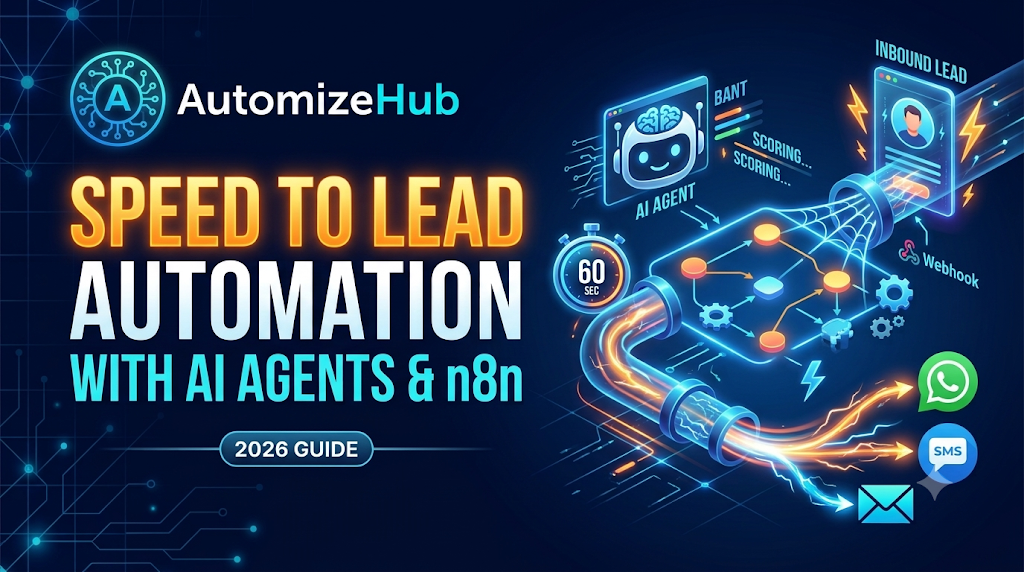
Speed to lead automation is the process of using workflow software like n8n and AI agents to capture, qualify, and reply to new inbound leads in under 60 seconds. Instead of making buyers wait hours for a human sales rep, the system sends instant, personalized replies across SMS, WhatsApp, or email and books meetings on your calendar automatically.
If you run a B2B company, a SaaS business, or a service agency in the United States, you already know how expensive traffic has become. You spend thousands of dollars every month on Google Ads, LinkedIn Ads, and SEO just to get a buyer to fill out your contact form. Then the lead sits in your CRM for hours while your sales team is stuck in meetings or asleep.
Across sales communities on Reddit (including r/CRM, r/salesdevelopment, and r/n8n), founders and sales leaders share the same painful reality: when a buyer has a problem, they open 3 or 4 competitor websites in different browser tabs and fill out all of their forms at the exact same time. The company that replies first while the buyer is still sitting at their desk wins the deal more than half the time.
In this complete 2026 guide, you will learn the real math behind lead response time, why simple Slack alerts and old email templates fail, and how to build a production-grade speed to lead automation workflow using n8n and AI agents.
The 2026 Speed to Lead Math: Why Minutes Cost Millions
Before you build an automation workflow, you need to know how to measure your current response time accurately. The true formula for speed to lead is:
Speed to Lead = Timestamp of First Meaningful Two-Way Outreach minus Timestamp of Form Submission
Many sales teams make the mistake of only counting business hours (9 AM to 5 PM) when tracking response speed. Worse, they count an automated “Thank you, we will reach out in 24 hours” email as a first touch. Buyers do not care about your office hours. If a prospect submits a form at 7 PM on a Tuesday and hears nothing until 9 AM on Wednesday, that is a 14-hour delay.
Research from Harvard Business Review, MIT, InsideSales, and 2026 revenue operations benchmarks shows exactly what happens to your conversion rate as each minute passes:
| Response Time Window | Impact on Lead Conversion and Qualification | Source / Benchmark |
|---|---|---|
| Under 1 Minute | 391% increase in lead conversions compared to waiting even 2 minutes. | Velocity / InsideSales Study |
| Under 5 Minutes | 21x more likely to qualify the lead and 100x more likely to connect live. | MIT & Harvard Business Review |
| 5 to 30 Minutes | Lead qualification odds drop by 400% as buyers leave their screen. | Lead Response Management Study |
| First Responder Advantage | 78% of B2B and high-ticket buyers purchase from the first company that responds. | LeadAngel / Vendasta Report |
| Average B2B Response Time | 42 hours across US companies, and 51% of inbound leads are never contacted at all. | Harvard Business Review & InsideSales |
Why Slack Alerts and Basic Autoresponders Still Fail
When companies realize their response time is too slow, they usually try two quick fixes: sending an automated confirmation email or firing a Slack notification to the sales channel. Both approaches fail in real-world sales environments.
1. The Slack Alert Bottleneck
In a recent discussion on r/CRM, sales operations managers pointed out that even with instant Slack or Microsoft Teams alerts, their median human response time stayed over 60 minutes. Why? Because your top account executives are already on discovery calls, writing proposals, or eating lunch. A Slack ping tells a rep that a lead arrived, but it does not engage the buyer while they are hot.
2. Long Web Forms Kill Conversion Before Automation Even Starts
Many B2B teams force buyers to fill out 10 to 12 form fields (company size, annual revenue, job title, phone number, project scope) just to qualify them. Benchmark data from Default shows that shortening your web form to 5 fields or fewer increases form conversion rates by 200%. With modern speed to lead automation, you only ask for Name, Work Email, Phone, and one short question. Your n8n workflow handles the company lookup in the background.
3. The “2-Second Creepy Bot” Problem
On the other side, sales reps on r/salesdevelopment warn against sending a giant wall of AI text 2 seconds after a form is submitted. When a 4-paragraph message lands on a buyer’s phone 2 seconds after clicking submit, they immediately know it is a bot and ignore it. The highest-converting AI workflows wait 35 to 60 seconds and send a short, human-sounding two-line text message that references what the buyer just asked.
The 6-Step Production Architecture for Speed to Lead Automation in n8n
A toy workflow simply connects a form to OpenAI and sends an email. A production system built for real revenue teams includes safeguards against duplicate webhooks, CRM clutter, and bot loops. Here is the exact 6-step architecture we deploy using n8n.
Step 1: Instant Webhook Capture and Idempotency Lock
Your workflow begins with an n8n Webhook node connected to your website form (Elementor, Webflow, HubSpot, Typeform) or Meta/LinkedIn Lead Ads. In production, users often double-click the submit button on slow mobile connections. To stop your AI from sending two identical texts to the same buyer, add an idempotency check in n8n using Redis or a data table. Hash the buyer’s email and date. If that hash was processed in the last 10 minutes, stop the duplicate run immediately.
Step 2: Spam Filtering and CRM Deduplication Check
Before you spend money on data enrichment APIs or OpenAI tokens, clean the input. Filter out disposable email domains and test submissions. Next, query your CRM (HubSpot, Salesforce, or Pipedrive) by email and phone number:
- Existing Customer: Route the ticket to account management instead of new sales.
- Open Active Deal: Alert the assigned account executive directly instead of starting a cold sequence.
- Net-New Lead: Create the contact record and proceed to enrichment.
Step 3: Backend Data Enrichment and 3-Bullet Rep Summary
Next, an HTTP Request node in n8n calls an enrichment tool like Apollo, Clearbit, or Proxycurl using the buyer’s work email. Within 3 seconds, n8n pulls their LinkedIn job title, company headcount, industry, and location. Instead of dumping 40 raw data fields into Slack, pass this data to an LLM node to generate a clean 3-bullet summary for your sales rep. Revenue teams using 3-bullet AI summaries in Slack respond 31% faster because reps do not have to click through five CRM tabs before calling.
Step 4: Tiered Intent Scoring and SLA Routing
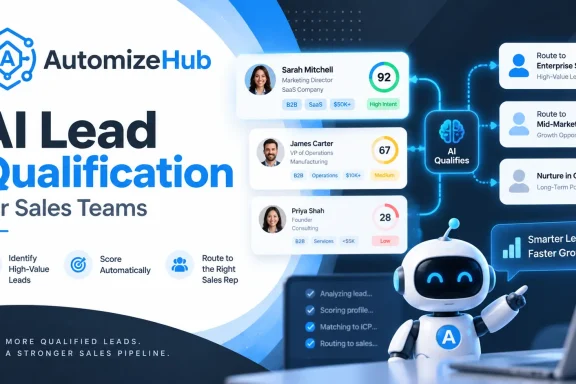
Not every lead wants a phone call in 45 seconds. A prospect who filled out your “Request Pricing” form has very different intent than a student who downloaded a free PDF checklist. Use an AI classification node to score the lead based on Budget, Authority, Need, and Timeline (BANT). For a deeper look at how scoring logic works, read our full guide on AI lead qualification for sales teams.
- Tier 1 (High Intent / Demo & Pricing Requests): SLA under 60 seconds via SMS/WhatsApp + Email + Instant Slack claim button for reps.
- Tier 2 (Medium Intent / Product Questions): SLA under 3 minutes via personalized email with an interactive calendar link.
- Tier 3 (Low Intent / Ebook Downloads): Route to an educational email sequence without waking up your sales reps.
Step 5: Channel-Specific AI Outreach (With a 45-Second Human Delay)
Add an n8n Wait node set to 45 seconds so your outreach feels natural. Then trigger your AI agent to send the first message. Never use the same prompt for email and SMS:
- SMS and WhatsApp Rule: Keep it under 160 characters, casual, and end with one simple question. Example: “Hi Sarah, saw your note on AutomizeHub about automating HubSpot lead routing. Are you currently using n8n or starting fresh?”
- Email Rule: 3 short paragraphs addressing their specific use case, one relevant case study metric, and a direct booking link.
If your prospects also send PDFs, RFPs, or onboarding forms during the sales process, you can connect this pipeline to an AI document automation workflow to extract project requirements automatically.
Step 6: Inline Calendar Booking and 5-Minute SLA Fallback Timer
Adding instant scheduling to your lead flow cuts time-to-booked-meeting from 48 minutes down to 2 minutes. When the buyer replies to your AI agent on SMS or WhatsApp, the agent answers their initial question and drops a direct Cal.com, Calendly, or HubSpot meeting link. At the same time, n8n runs a 5-minute fallback timer: if the primary sales rep does not click “Claim Lead” in Slack within 5 minutes, n8n automatically reassigns the lead to the next available rep on the round-robin list.
Copy-Paste System Prompt for Your n8n Speed to Lead AI Agent
One of the biggest complaints on r/RealEstateTechnology and B2B forums is the “bot interrogation loop,” where an AI agent annoys the buyer by asking 7 questions in a row. To prevent this, paste this tested system prompt into your n8n AI Agent node:
You are a friendly, helpful Sales Coordinator at [Company Name].
A new lead just submitted a form on our website.

Lead Data:
- Name: {{ $json.first_name }}
- Company: {{ $json.company_name }} ({{ $json.company_size }} employees)
- Role: {{ $json.job_title }}
- Message Submitted: "{{ $json.message }}"

Strict Rules for Your Reply:
1. Write a short SMS/WhatsApp message under 160 characters.
2. Do NOT use robotic greetings like "I hope this message finds you well" or "Thank you for contacting us."
3. Directly mention the specific topic or tool they wrote in their message so they know a real person read it.
4. Ask ONLY ONE simple question to confirm their timeline or main goal. Never ask more than 2 questions in the entire conversation before offering the calendar link: [Insert Booking Link].
5. Use simple, plain English. Do not use hype words, emojis, or dashes.
4 Critical Mistakes That Kill AI Speed to Lead (And US Compliance Rules)
If you are targeting buyers in the United States, your speed to lead automation workflow must follow strict telecom and privacy rules:
- Ignoring US TCPA and A2P 10DLC SMS Compliance: Never send automated SMS or AI voice calls (via Twilio, Vapi, or Retell) to US phone numbers unless your web form has a clear opt-in consent checkbox. Your Twilio number must be A2P 10DLC registered, and your n8n workflow must have a hard keyword check at the start that immediately halts messaging if a user replies “STOP” or “UNSUBSCRIBE”.
- Trapping Buyers in a 6-Question Bot Loop: Buyers want answers, not an exam. Limit your AI agent to 1 or 2 qualifying questions before giving them a direct calendar link or transferring them to a live human rep.
- Forgetting Conversation Memory: When a buyer replies to your SMS or WhatsApp message, your n8n workflow must connect to a Postgres or Redis memory node so the AI remembers what it asked 2 minutes ago.
- No Human Takeover Switch:The moment a human sales rep jumps into the thread from Slack or the CRM, n8n must pause the AI agent for that contact so the bot and the human never talk over each other.
2026 Cost and ROI Comparison: Manual SDR vs. SaaS vs. Custom n8n AI Build
How much does it cost to run a sub-60-second lead response system? When a team of 5 sales reps saves just 5 hours a week on manual triage and follow-up (at a $45/hour loaded cost), the business recovers roughly $4,900 per month in active selling time. Here is how the three main options compare in 2026:
| Feature / Metric | Manual SDR Follow-Up | Enterprise SaaS Tools (Chili Piper / Qualified) | Custom n8n + AI Agent Workflow |
|---|---|---|---|
| Average Response Time | 1 to 42 hours | 1 to 5 minutes | 35 to 60 seconds (24/7) |
| Monthly Software Cost | $4,000+ per SDR salary | $800 to $2,500+ per month (per-seat fees) | $50 to $200/month (n8n + LLM + Twilio usage) |
| Multi-Channel (SMS, WhatsApp, Email) | Manual and inconsistent | Often locked behind expensive add-ons | Included natively via API |
| Custom CRM & Enrichment Logic | Manual copy-paste | Rigid template rules | 100% customizable in n8n |
| Data Ownership | In CRM | Third-party vendor lock-in | Self-hosted or private cloud |
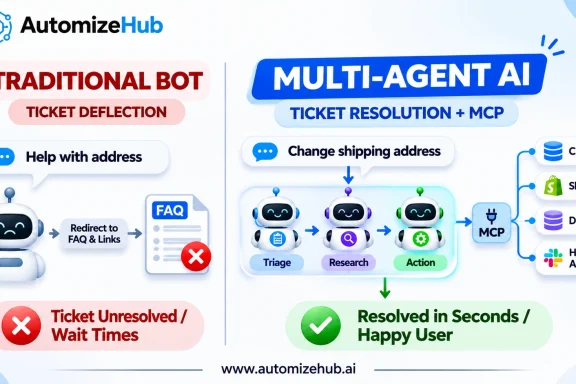
If you want a production-ready system without spending weeks debugging webhooks, A2P compliance, and CRM edge cases yourself, explore our custom AI agents for customer service and sales automation engineering services.
Frequently Asked Questions About Speed to Lead Automation
What is a good speed to lead benchmark in 2026?
For high-intent inbound leads such as demo requests, pricing inquiries, and contact forms, the gold standard in 2026 is under 60 seconds for initial AI-assisted outreach and under 5 minutes for live human follow-up. Responding within 60 seconds boosts conversion rates by up to 391% compared to slower follow-ups.
Does AI speed to lead automation replace human sales reps?
No. Speed to lead automation replaces the slow, repetitive work of looking up company data, filtering out spam, and sending the first touch message at 11 PM. Once the AI agent verifies that the buyer is qualified and books the call, your human account executive takes over to run the demo and close the contract.
Why use n8n instead of Zapier for speed to lead workflows?
Zapier charges per task, which gets very expensive when every form submission triggers 10 steps (deduplication, enrichment, AI scoring, Slack summary, SMS, email, and fallback timers). Furthermore, n8n includes native AI Agent nodes, memory management (Postgres/Redis), and branching logic at a fraction of the monthly cost.
How do you keep AI lead responses from sounding robotic?
Add a 35 to 60 second delay before sending the first message, restrict SMS and WhatsApp replies to under 160 characters, reference the exact problem the buyer typed into the form, and instruct the AI to ask only one simple question instead of sending a long sales pitch.
Turn More Inbound Leads Into Booked Calls Today
Every hour your leads wait in a queue is budget handed directly to your competitors. By combining short web forms, backend enrichment, and a 60-second n8n AI response workflow, you capture buyers at the exact moment their intent is highest.
Ready to cut your lead response time from hours to under 60 seconds? Contact AutomizeHub today to book a free strategy call, or check out our AI agents for customer service page to see how we build custom multi-agent systems in 14 days.

No Comments