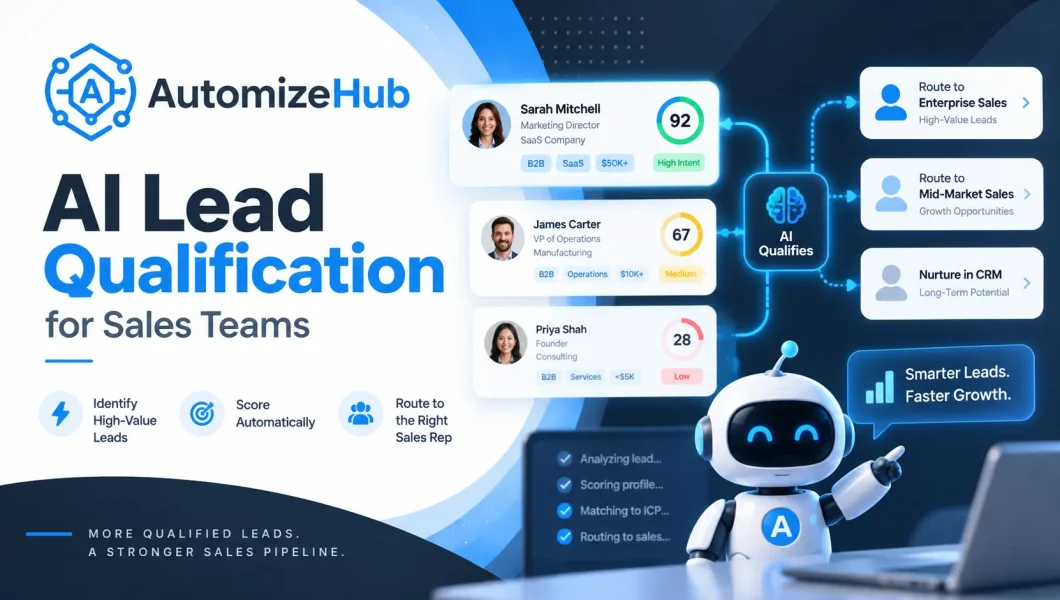
AI lead qualification uses artificial intelligence to decide whether a prospect is a good fit for your business, how ready they are to buy, and what should happen next.
A good qualification system can check lead data, understand the reason behind an enquiry, ask for missing information, update a CRM, and route the lead to sales, follow-up, booking, nurture, or human review.
But there is an important difference between a useful qualification system and a simple AI score.
A useful system should tell you:
- Does this lead fit the business?
- How strong is the buying intent?
- What evidence supports the decision?
- What information is still missing?
- How confident is the system?
- What should happen next?
This guide explains how to build that type of sales process without turning AI into an uncontrolled decision-maker.
If you are planning an AI automation project, first read our guide on building AI systems with a problem-first approach. The business problem should come before the AI tool.
What Is AI Lead Qualification?
AI lead qualification is the process of using AI and automation to evaluate a new prospect against your sales criteria and decide the next action.
In simple terms:
Lead → Evidence → Qualification Decision → Next Action
The system may check company details, customer needs, buying timeline, job role, location, budget, website activity, conversation answers, CRM history, and other information that matters to your business.
It can then decide whether the lead should:
- Go directly to sales
- Book a meeting
- Answer another qualification question
- Enter a nurture sequence
- Go to human review
- Be closed as not a fit
The important point is that AI should work with qualification rules defined by your business. It should not invent what a good customer looks like.
AI Lead Qualification vs Lead Scoring vs Lead Generation
These terms are often mixed together, but they solve different parts of the sales process.
| Process | Main Question | Typical Output |
|---|---|---|
| Lead Generation | Who could become a customer? | New leads |
| Lead Enrichment | What useful information is missing? | Better lead data |
| AI Lead Scoring | Which leads should get more attention? | Score or ranking |
| AI Lead Qualification | Should this lead move forward, and what should happen next? | Decision, reason, confidence, and action |
For example, an AI lead scoring system might return:
Score: 82/100
That can help prioritize the lead, but the number still leaves questions.
A stronger qualification result might say:
High fit. High buying intent. Budget is still unknown. Ask one budget question before offering a demo.
That is more useful because the result is connected to the next sales action.
The 5-Part AI Lead Qualification Model
A reliable qualification system should not depend on one score.
A practical model can evaluate five parts:
1. Fit
Fit asks whether this person or company matches the type of customer your business can serve well.
Fit may include:
- Industry
- Company size
- Location
- Job role
- Business type
- Use case
- Current software or technology
Your sales and marketing team should define these rules based on your actual business.
2. Intent
Intent asks how strongly the prospect appears to be considering a purchase or next step.
Strong signals may include:
- Asking for pricing
- Requesting a demo
- Sharing an active project
- Giving a clear implementation timeline
- Asking detailed integration questions
- Explaining a problem that needs to be solved soon
Fit and intent should not be treated as the same thing.
A perfect-fit company may not be ready to buy today. A high-intent prospect may also be a poor fit for your business.
3. Evidence
The AI should show why it reached its conclusion.
Instead of:
This is a strong lead.
The system should return evidence such as:
- Company size matches the target range
- The contact is responsible for the relevant department
- The prospect has an active project
- The requested service matches what the company provides
- The prospect requested a technical discussion
If something important is unknown, mark it as unknown.
Do not let the AI guess a missing budget, timeline, job role, or company detail.
4. Confidence
Not every AI decision should be treated equally.
The system should know when the information is strong and when the situation is unclear.
| Confidence | Suggested Action |
|---|---|
| High | Continue the approved automated path |
| Medium | Ask for missing information |
| Low | Send to human review |
5. Action
The qualification process is incomplete until something happens.
A result should lead to a clear next step.
For example:
- Qualified: alert sales and offer a meeting
- Good fit but not ready: start nurture
- Missing information: ask another question
- Low confidence: send to a human
- Not a fit: close politely
Why Sales Teams Use AI Lead Qualification
The biggest benefit is not simply saving a few minutes of manual work.
The real value is making the first part of the sales process faster and more consistent.
Faster Response
A new enquiry can be checked as soon as it enters the system instead of waiting for a sales rep to open a spreadsheet or CRM.
Less Manual Triage
Salespeople do not need to manually research and sort every incoming enquiry before deciding who deserves attention.
More Consistent Decisions
The same business rules can be applied to every lead.
That does not make AI automatically correct, but it reduces random differences in how leads are screened.
Better Sales Context
The sales rep can receive more than a name and email address.
The handoff can include:
- Qualification status
- Reason for the decision
- Customer need
- Buying timeline
- Important conversation details
- Missing information
- Recommended next step
Better Handling Across Channels
The same qualification policy can support leads coming from forms, website chat, WhatsApp, email, phone calls, and other approved channels.
How AI Lead Qualification Works Step by Step
Step 1: Capture the Lead
A lead may arrive from a website form, chatbot, ad campaign, WhatsApp conversation, email, phone call, CRM, or another source.
Step 2: Check for an Existing Lead
Before creating another record, check whether the person or company already exists.
This matters when a prospect contacts the business through several channels.
Step 3: Validate the Basic Data
Check required fields such as name, company, email, phone number, region, or other fields your sales process needs.
Bad input data can create bad qualification decisions.
Step 4: Enrich Missing Information
The workflow can use your CRM, internal records, company websites, approved enrichment providers, and other permitted sources to find useful missing details.
Only collect information you have a valid reason and permission to use.
Step 5: Apply Clear Business Rules First
Not every decision needs a language model.
If your company does not serve a certain region, or if a lead clearly falls outside a required business condition, a normal rule can handle that decision.
Use simple rules for simple decisions.
Use AI when you need to understand language, context, intent, or unclear information.
Step 6: Understand the Enquiry
The AI can read a form response, email, chat message, or call summary and identify what the prospect actually wants.
This may include:
- Problem they want to solve
- Urgency
- Expected outcome
- Project type
- Possible objections
- Buying intent
Step 7: Ask Missing Questions
If there is not enough information to make a reliable decision, continue the conversation.
For example:
“When are you planning to start this project?”
or:
“Who will be involved in the final decision?”
Do not ask ten questions when one question is enough.
Step 8: Evaluate Fit and Intent
Now the system compares the lead with your customer-fit rules and looks at buying signals separately.
Step 9: Produce a Structured Result
The output should be easy for both people and software to understand.
Useful fields include:
- Fit
- Intent
- Qualification status
- Confidence
- Evidence
- Missing information
- Recommended action
Step 10: Apply Human Review Rules
High-value, unusual, conflicting, or low-confidence cases should not automatically continue without review.
Step 11: Route the Lead
The workflow can route the lead to a sales rep, nurture sequence, booking flow, specialist team, or human review queue.
Step 12: Update the CRM
Store the useful information in clean CRM fields instead of hiding everything inside one long AI response.
Step 13: Trigger the Next Action
The next action may be a meeting invitation, WhatsApp message, email, sales alert, follow-up sequence, or another business step.
Step 14: Save the Result
Store the decision so you can compare it with what happened later in the sales process.
What Data Should AI Use to Qualify a Lead?
A strong system uses signals that actually matter to the sales decision.
| Signal Type | Examples | Main Purpose |
|---|---|---|
| Firmographic | Industry, company size, region | Fit |
| Contact | Role, department, seniority | Fit and authority |
| Technographic | CRM, ecommerce platform, existing tools | Fit and technical need |
| First-Party Behavior | Demo request, pricing activity, product usage | Intent |
| Conversation | Need, urgency, objections, timeline | Intent and need |
| CRM History | Previous conversations, opportunity history, source | Context |
| Negative Signals | Spam, unsupported market, unrelated enquiry | Disqualification |
More data is not always better.
Use the minimum data needed to make a useful business decision, and make sure the sources you use fit your privacy, consent, platform, and legal requirements.
Which Lead Qualification Framework Should You Use?
AI does not remove the need for a qualification framework.
It can help apply the framework consistently and understand answers, but your team still needs to decide what matters.
BANT
BANT stands for Budget, Authority, Need, and Timing.
It is useful when these four conditions strongly affect whether your business can move a deal forward.
CHAMP
CHAMP starts with the customer’s challenge.
This can work well when understanding the business problem matters more than asking for budget immediately.
MEDDIC
MEDDIC is more detailed and can be useful for complex B2B deals involving several people and decision steps.
Your Own Customer Profile
Your closed sales can also show useful patterns.
You may find that your best customers share company sizes, use cases, roles, industries, technologies, timelines, or other signals that a general framework does not cover.
A practical system can combine a known framework with your own sales rules and real outcome data.
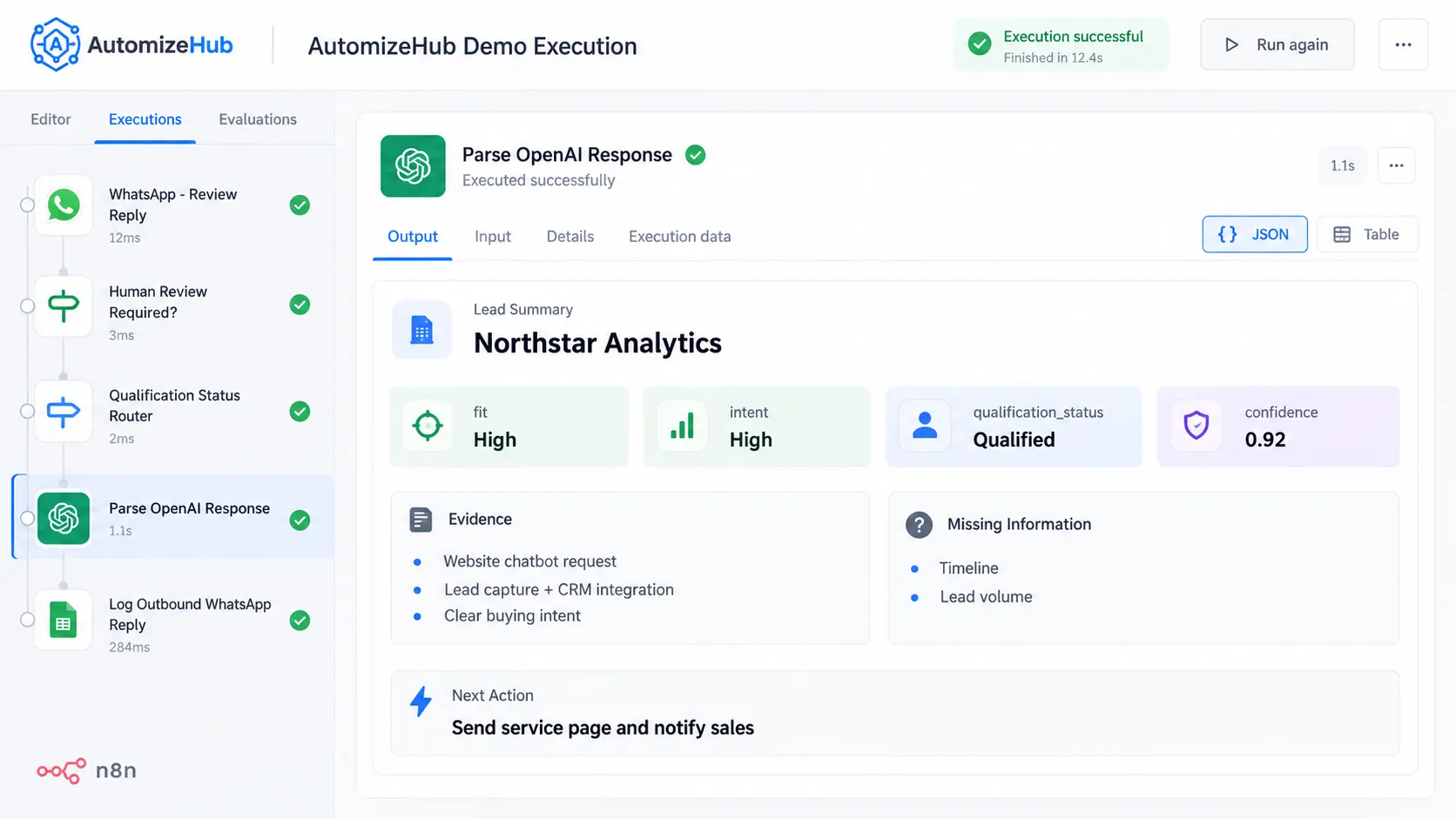
Example of an AI Qualification Decision
Consider this fictional lead:
| Company | Northstar Analytics |
|---|---|
| Company Size | 85 employees |
| Need | Automate inbound sales qualification |
| Timeline | Within 45 days |
| Budget | Not confirmed |
| Contact | Head of Revenue Operations |
| Intent | Requested a technical demo |
A weak output might be:
Score: 87/100
A more useful structured result could look like this:
{
  "fit": "high",
  "intent": "high",
  "qualification_status": "review",
  "confidence": 0.84,
  "missing_information": [
    "budget approval"
  ],
  "evidence": [
    "company size matches target range",
    "contact role is relevant",
    "active implementation timeline",
    "technical demo requested"
  ],
  "next_action": "ask budget question, then offer a demo"
}
The second result is easier to use because another workflow or sales rep can understand both the decision and the reason.
How to Build the Workflow in n8n
n8n can be used as the workflow layer between your lead source, AI model, CRM, messaging tools, calendar, and internal systems.
A simple architecture may look like this:
Lead Source → Duplicate Check → Enrichment → Business Rules → AI Analysis → Validation → Routing → CRM → Follow-Up or Booking
The AI model does not need to control the complete process.
For example, normal IF, Switch, or Code steps can handle fixed rules while the AI model handles text, context, or unclear answers.
This makes the workflow easier to understand, test, and control.
A real workflow may also need:
- Conversation memory
- Error handling
- Retries
- Duplicate prevention
- Human approval
- CRM field validation
- Logging
You can explore more implementation content in our AI agent tutorials and step-by-step guides.
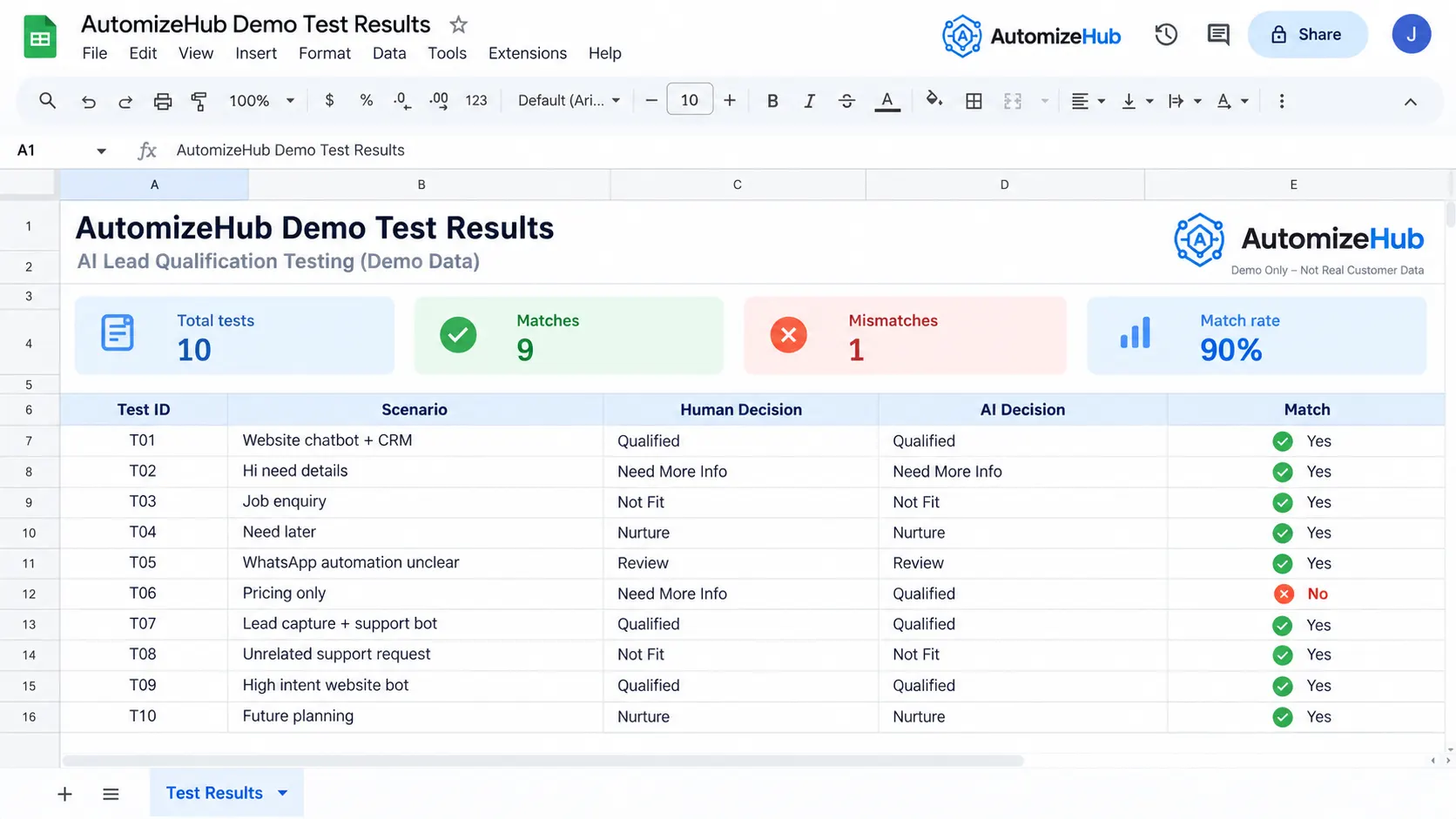
Real Demo Test You Should Run Before Going Live
Building the workflow is only the first part.
The harder question is whether the decisions are good enough for your sales process.
A simple test can reveal problems before real leads are affected.
Step 1: Create 8 to 12 Fictional Leads
Include different cases:
- Clear high-fit lead
- Clear bad-fit lead
- Good company but low intent
- High intent but poor fit
- Missing budget
- Missing timeline
- Conflicting information
- Large strategic account
- Spam or irrelevant enquiry
- Lead that requires human judgment
Step 2: Have a Human Qualify Them First
Do this before looking at the AI result.
Step 3: Run the Same Leads Through the Workflow
Save the AI status, evidence, confidence, and next action.
Step 4: Compare the Decisions
| Lead | Human Decision | AI Decision | Match? | What We Learned |
|---|---|---|---|---|
| Test Lead 1 | [Add after test] | [Add after test] | [Yes / No] | [Real observation] |
| Test Lead 2 | [Add after test] | [Add after test] | [Yes / No] | [Real observation] |
If the AI and human disagree, do not hide the disagreement.
Check whether the problem came from:
- Bad instructions
- Missing data
- An unclear business rule
- A bad threshold
- Incorrect AI reasoning
Then improve the system and run the test again.
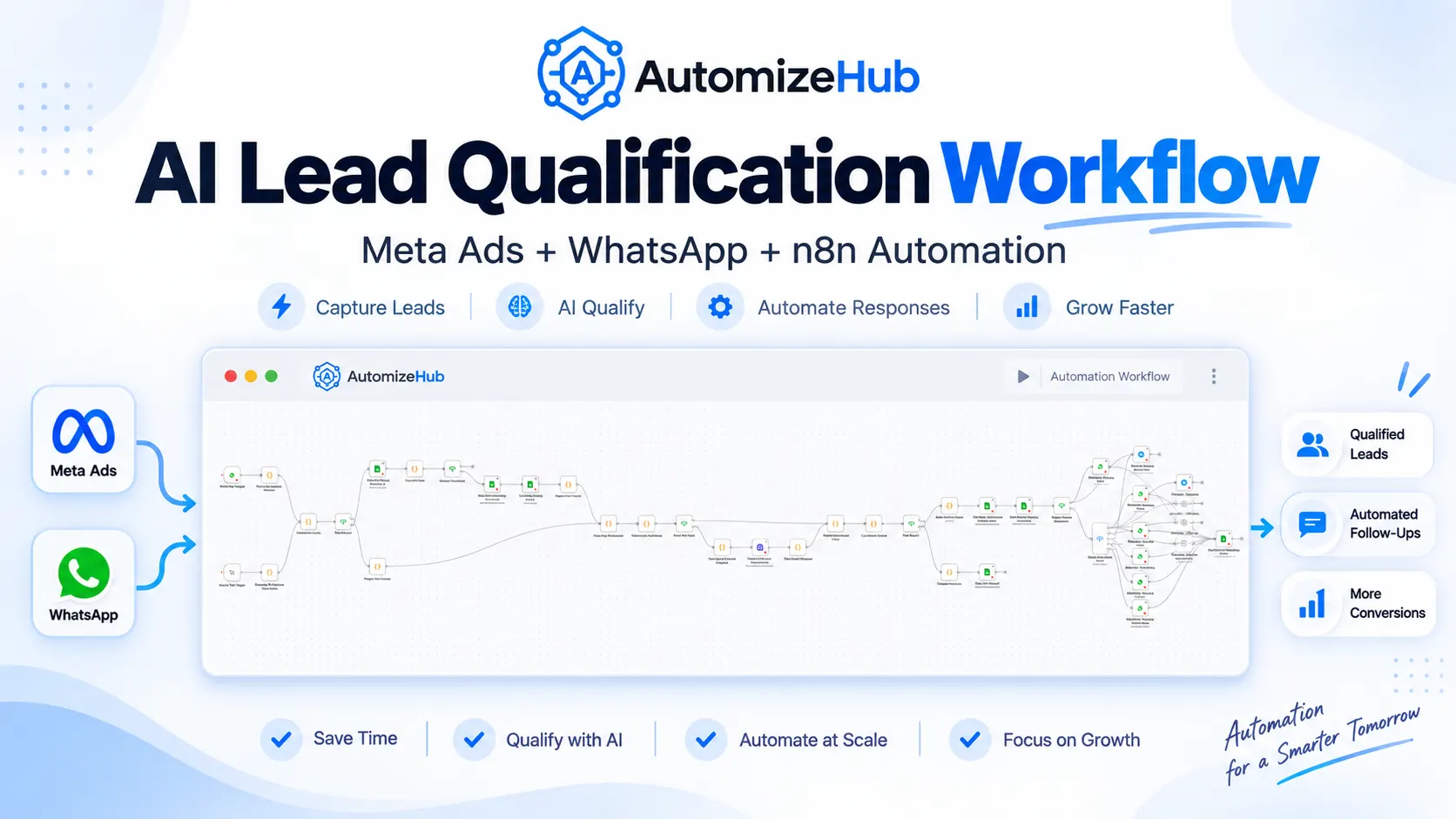
Real Example: Qualifying Meta Ads Leads on WhatsApp
Imagine a business is running Meta ads with a WhatsApp call-to-action. A prospect clicks the ad and sends a message asking about the service.
Instead of sending every enquiry directly to a salesperson, the workflow can first understand what the prospect needs and collect only the missing information required for qualification.
A simple workflow could look like this:
Meta Ad → WhatsApp Message → Lead Check → AI Qualification → Missing Questions → Qualification Decision → CRM → Sales or Follow-Up
For example, a prospect may say:
“We run a real estate business and receive around 200 Meta leads every month. Our team currently follows them up manually through WhatsApp and Excel.”
The system already has useful evidence from that first message. It knows the business type, approximate lead volume, lead source, and current problem.
Instead of asking for the same information again, it could ask:
“Are you looking to improve this process now, or are you still exploring options?”
If the prospect says the project needs to start this month, the workflow can combine that answer with the existing information and produce a structured qualification result.
The important part is that the AI does not simply reply to the WhatsApp message. It helps decide which lead should reach sales, what information is still missing, and what the next action should be.
AI Voice Qualification vs Chat, WhatsApp, and Email
A lead does not have to answer qualification questions through a website form.
The same sales logic can work across several channels.
| Channel | Good For | Main Challenge |
|---|---|---|
| Website Chat | Visitors who are already on your website | People may leave quickly |
| Simple ongoing conversations | Consent, messaging rules, and conversation state | |
| B2B leads that prefer asynchronous communication | Replies may be slow | |
| AI Voice | Fast qualification for phone-heavy businesses | Latency, interruptions, accents, and call quality |
A company may also combine channels.
For example:
Website Form → AI Voice Call → CRM Update → WhatsApp Confirmation → Human Sales Rep
The rules should remain consistent even when the conversation moves between channels.
If website chat is part of your lead process, see our AI chatbot for website service for lead capture, customer questions, and human handoff.
Where AI Lead Qualification Fails in Real Workflows
AI can speed up a sales process, but it can also make mistakes faster if the process is poorly designed.
The Business Has Not Defined a Qualified Lead
If sales and marketing do not agree on what a good lead means, the AI will receive unclear instructions.
Fix the qualification policy before automating it.
The Data Is Wrong
Old CRM records, bad enrichment data, duplicate contacts, or incorrect form information can change the result.
The Model Guesses Missing Information
If budget is unknown, the correct answer is “unknown.”
Missing information should not be invented just to complete the output.
A Score Is Treated as Truth
A score is a tool for making a decision.
It is not proof that somebody will become a customer.
The Same Person Appears Through Several Channels
A lead may fill a website form, send an email, and later write on WhatsApp.
The workflow should try to connect these interactions to the correct contact instead of creating three disconnected leads.
The Agent Asks Too Many Questions
Qualification should feel like a helpful conversation.
It should not feel like an interview that never ends.
There Is No Human Review Path
Do not force every lead into an automated yes or no decision.
The AI Decision Works but the CRM Step Fails
The model may classify the lead correctly, but the business can still lose the opportunity if the CRM update, notification, or meeting booking fails.
Important workflow actions should have error logging and safe retry logic.
Voice Works in a Demo but Fails With Real Calls
Voice systems should be tested with people speaking at different speeds, interrupting, changing their answer, using different accents, and calling from noisy environments.
The System Never Learns From Sales Outcomes
A qualification process can become outdated.
Compare its decisions with meetings, opportunities, wins, losses, and human overrides.
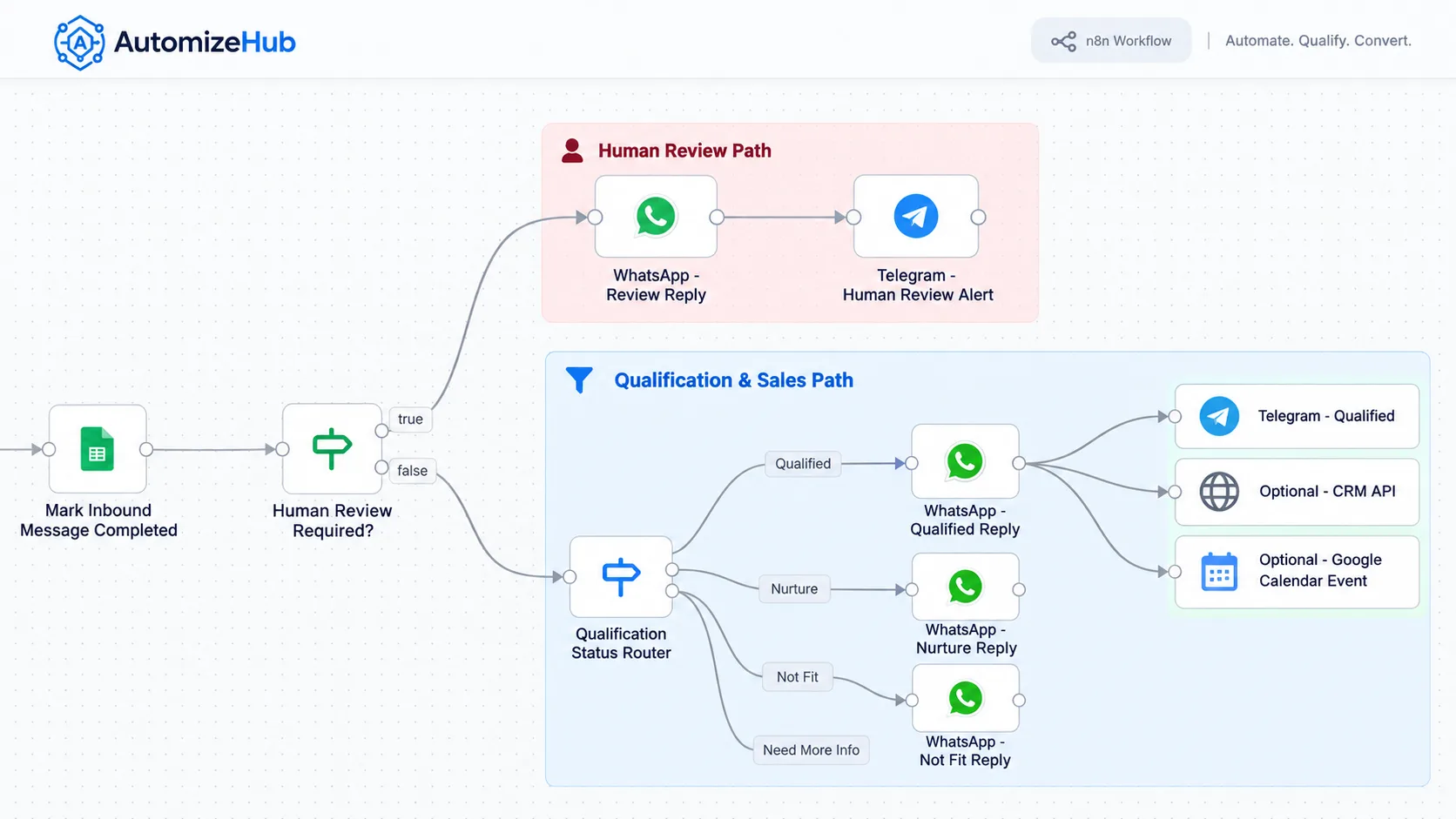
When Should a Human Take Over?
The goal is not to remove humans from every sales conversation.
The goal is to use human time where judgment matters most.
| Situation | Recommended Action |
|---|---|
| Low confidence | Human review |
| Strategic or high-value account | Send to senior sales rep |
| Conflicting answers | Clarify or review |
| Custom pricing request | Sales review |
| Legal, security, or contract question | Route to specialist |
| Prospect asks for a person | Immediate human handoff |
| Sensitive or angry conversation | Human intervention |
The person taking over should receive enough context to continue the conversation without asking the prospect to repeat everything.
How to Measure AI Lead Qualification
Do not measure success only by how many leads the system processes.
Measure whether the sales process improves.
| Metric | What It Helps Measure |
|---|---|
| First Response Time | How quickly leads receive attention |
| Qualification Rate | How many leads pass your criteria |
| Qualified Lead to Meeting Rate | Whether qualified leads take the next step |
| Meeting to Opportunity Rate | Whether qualification is finding real sales opportunities |
| False Positive Rate | How often poor leads are sent to sales |
| False Negative Rate | How often good leads are incorrectly rejected |
| Human Override Rate | How often people disagree with the AI result |
| Missing Data Rate | How often the system lacks enough information |
| Cost per Qualified Lead | Whether the process is becoming more efficient |
| Pipeline Generated | Whether qualified leads create business value |
The question is not:
“Does the AI sound smart?”
The better question is:
“Are better leads reaching sales, and are those leads moving forward?”
A Practical 30-Day Rollout
Week 1: Define the Sales Rules
Document your ideal customer, qualification criteria, strong buying signals, disqualification rules, required information, and human review conditions.
Week 2: Build One Controlled Workflow
Start with one lead source instead of connecting every channel at once.
Add required CRM fields, qualification output, error logging, and routing.
Week 3: Run in Shadow Mode
Let the AI make a decision, but keep the human decision as the real action.
Compare both results.
Week 4: Automate Only the Clear Cases
Once the system performs consistently, automate the high-confidence paths.
Keep unclear and high-value leads under human review.
Build vs Buy vs Custom AI Lead Qualification
There is no single best setup for every company.
| Approach | Best For | Main Limitation |
|---|---|---|
| CRM-Native AI | Teams working mainly inside one CRM | May offer less flexibility outside that platform |
| Lead Qualification SaaS | Businesses with standard qualification processes | Custom rules may be limited |
| n8n + AI APIs | Businesses connecting several tools and custom rules | Needs proper workflow design and maintenance |
| Custom AI System | Complex or unique processes, channels, and data | Requires more setup and testing |
If everything already happens inside one CRM, its built-in AI features may be enough.
If leads move between your website, email, WhatsApp, calendar, CRM, spreadsheets, internal APIs, and other systems, a custom workflow can provide more control.
Is AI Lead Qualification Right for Your Business?
It can be a strong fit if:
- You receive enough leads that manual screening takes significant time.
- Good leads sometimes wait too long for a response.
- Your sales team spends time checking low-quality enquiries.
- You already know what a strong customer looks like.
- You ask similar qualification questions repeatedly.
- Leads come from several channels.
- You already use a CRM or structured lead system.
You may not be ready yet if:
- Your team cannot define what a qualified lead means.
- Your CRM data is unreliable.
- You receive very few leads.
- Every sale requires deep human discovery from the first conversation.
- Your qualification rules change constantly.
Fix the process first. Then automate it.
Build an AI Lead Qualification Workflow with AutomizeHub
Your lead process may start with a website form, chatbot, WhatsApp message, email, phone call, CRM entry, or ad campaign.
The right workflow depends on how your business actually works.
AutomizeHub can connect your lead sources, AI models, business rules, CRM, messaging tools, calendar, and human review process into one custom system.
A typical setup may look like:
Lead Capture → Enrichment → Qualification → CRM → Follow-Up → Booking → Human Handoff
The goal is not to put AI into every step.
The goal is to remove slow repetitive work while keeping important sales decisions visible and controlled.
Map Your Lead Qualification Workflow with AutomizeHub
Frequently Asked Questions
1. What is AI lead qualification?
AI lead qualification uses AI and automation to check whether a prospect fits your business, understand buying intent, collect missing information, and decide the correct next sales action.
2. How does AI qualify a sales lead?
It can evaluate customer profile data, CRM history, behavior, conversation answers, business needs, buying timeline, and other approved signals against qualification rules defined by your company.
3. What is the difference between AI lead scoring and AI lead qualification?
AI lead scoring usually ranks a prospect or gives them a score. Qualification goes further by deciding whether the lead should move forward and what action should happen next.
4. What information can AI use to qualify a lead?
The system may use company size, industry, location, contact role, CRM history, website activity, stated need, urgency, buying timeline, conversation answers, and other relevant data your business is permitted to use.
5. Can AI qualify leads through WhatsApp?
Yes. A qualification workflow can collect answers through WhatsApp and use the same business rules used for website, CRM, email, or other channels.
6. Can AI qualify leads over a phone call?
Yes. AI voice agents can ask qualification questions, collect answers, and pass structured information into a CRM or workflow. Voice systems need careful testing for latency, interruptions, accents, unclear responses, and human handoff.
7. Can AI automatically book a meeting after qualification?
Yes. If the lead meets approved criteria, the workflow can connect to a calendar or booking tool, offer available times, update the CRM, and notify the correct sales rep.
8. When should a human review an AI-qualified lead?
Human review is useful when confidence is low, information conflicts, the opportunity is strategically important, pricing is custom, the prospect asks for a person, or the conversation involves sensitive, legal, security, or contract issues.
9. How do you know if AI lead qualification is working?
Measure outcomes such as qualified-to-meeting rate, meeting-to-opportunity rate, false positives, false negatives, human overrides, response time, cost per qualified lead, and pipeline created.
Final Thoughts
AI lead qualification should do more than attach a number to a new prospect.
A useful system checks fit and intent separately, shows the evidence behind its decision, marks missing information clearly, measures confidence, and connects every result to a clear next action.
The strongest workflow is not the one that removes every human from sales.
It is the one that handles repetitive qualification quickly while making sure the right leads reach the right people with enough context to continue the conversation.
Start with a clear definition of a qualified lead, test your rules with controlled examples, measure real sales outcomes, and automate only the decisions you can trust.
Sources and Further Reading
- Clay: AI Lead Qualification
- Clay: Lead Qualification Guide
- Relevance AI: Lead Qualification
- Patagon AI: Lead Qualification and Auto-Booking
- Lyzr: AI Agents for Lead Qualification
- Zingly: AI in Lead Qualification
- Verse: AI Lead Qualification
- Google Search Central: Generative AI Search Optimization Guide


No Comments